Nerd Tool/Geek Tool
Check out Geektool here: http://projects.tynsoe.org/en/geektool/
Check this site for some nice 'geeklets' : http://www.macosxtips.co.uk/geeklets/
And check out Nerdtool (originally geektool-3) here: http://wiki.github.com/balthamos/geektool-3
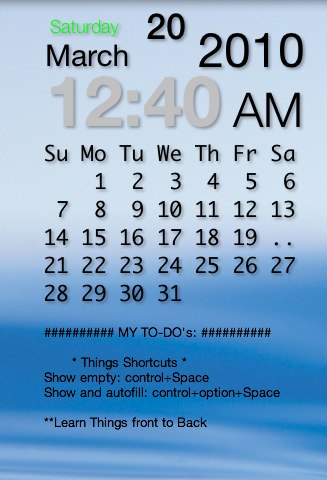
My Nerd Tool
NerdTool Scripts:
Calendars
Typical Calendar with day highlighted by two dots ..
cal | sed -e '1d' | sed "s/^/ /;s/$/ /;s/ $(date +%e) / $(date +%e | sed 's/././g') /"
Vertical Days:
New shell.
cal | sed -e '1d' -e '2p;2p;2p;2p' -e '3d' -e '4d' -e '5d' -e '6d' -e '7d'
size window and apply the 'wrap output' setting
Vertical Calendar Dates:
New shell:
cal | sed -e '1d' -e '2d' -e '2p;2p;2p;2p' | sed -e '$!N;s/\n/ /' -e '$!N;s/\n/ /' -e '$!N;s/\n/ /' -e '$!N;s/\n/ /' | sed "s/^/ /;s/$/ /;s/ $(date +%e) / $(date +%e | sed 's/././g') /"
size window and apply the 'wrap output' setting
All using the 'Shell' selection:
Date:
date +%d
Month:
date +%B
Day:
date +%A
Time:
date +"%I:%M"
Alternatives:
- Without the '0' infront of the hours 1-9, use:
date +%l:%M - 24 hour clock, with seconds:
date '+%H:%M:%S' - 24 hour clock, without seconds:
date '+%H:%M'
AM/PM: date +"%p"
Font: Helvetica Neue (Regular, Bold, Light)
Nice Geektool implementation
http://www.macosxtips.co.uk/geeklets/weather/weather-icon-accuweather/
The files needed are: (remove the .txt extension)
  Weather show PNG1.glet.txt

  Weather get Accu.glet.txt

  sym9.zip